A menu-bar app for macOS desktops
Your desktops,
arranged in rows.
macOS lines your desktops up in one long strip. MiliControl groups them into rows — Home, Work, Side project — and moves you around the grid with macOS’s own slides. Plus a calm dashboard, a living notch and your favourite sites, one shortcut away.
- Free & open source
- macOS 13+
- Apple silicon & Intel
- Signed & notarized
Desktop 1 · Home
Home
Work
Side project
Click here and use your arrow keys.
Why MiliControl
Nine desktops in a line is a lot of swiping.
Give each part of your life its own row and you’re never more than a couple of slides away. MiliControl decides where to go; macOS does the switch — so it feels exactly like your Mac, only organised.
macOS
With MiliControl
The grid view
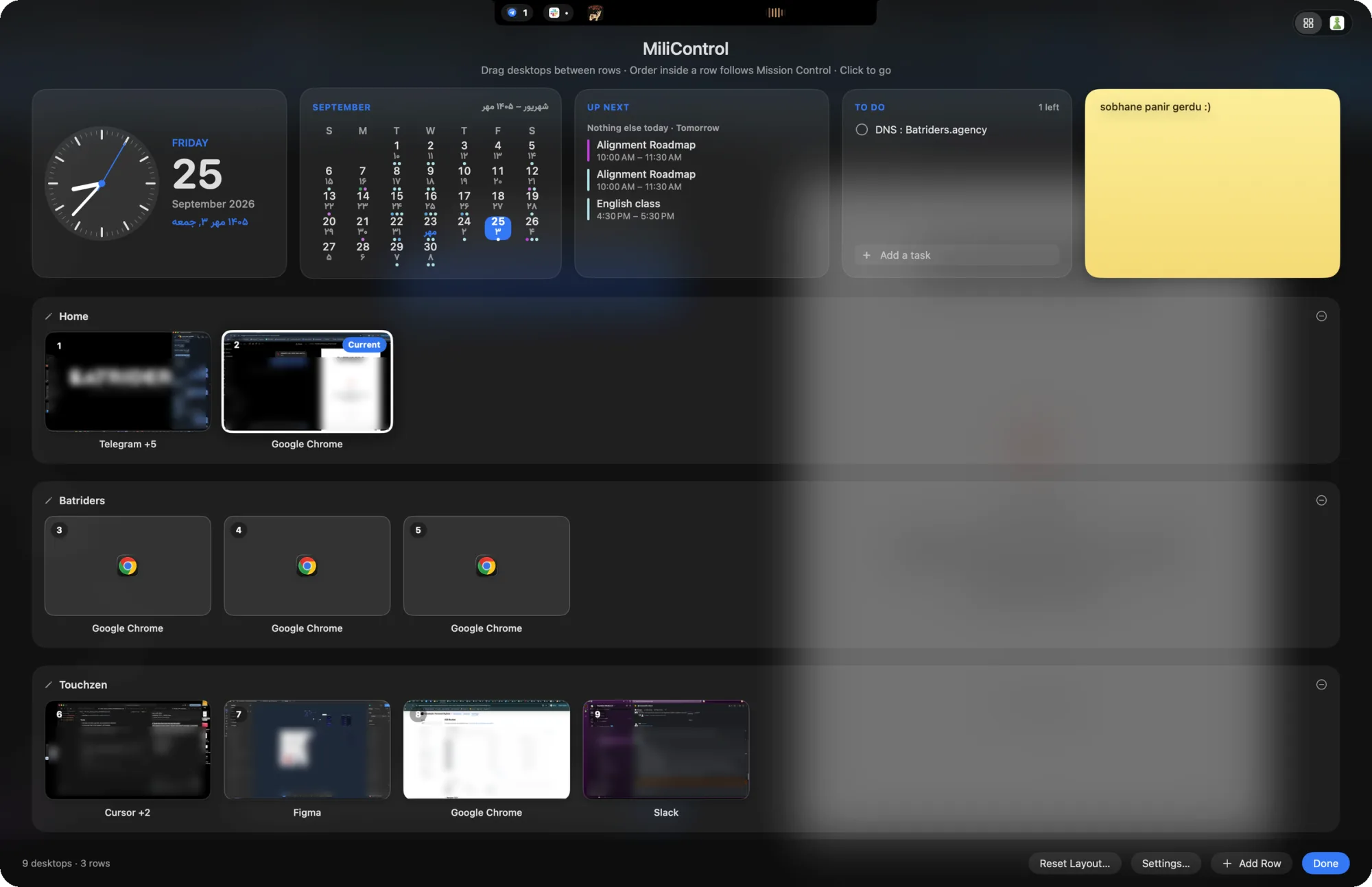
Every desktop, and your day, at a glance
Press ⌃ ↑ for live previews of every desktop and fullscreen app, above a dashboard with your calendar, what’s next, a to-do list and a sticky note. Drag desktops between rows, click one to go.
Features
Small app. Your whole Mac,
a little calmer.
Grid navigation
⌃⌥ ← → moves within a row, ⌃⌥ ↑ ↓ between rows. Tap to slide instantly, or hold the arrow to see the whole grid and jump anywhere in one slide. Four-finger swipes work too.
The grid view
Live previews of every desktop and fullscreen app, with browser profiles (“Chrome · Work”) on each tile.
A calm dashboard
Clock, month calendar with your events, up next, to-dos and a note. Add a second calendar — Persian, Hijri, Hebrew and more.
A living notch
Spotify and Apple Music widen the notch with artwork and a little wave. New Telegram, WhatsApp and Slack messages drop down from it.
Web tabs
Keep chess.com, YouTube, ChatGPT — any site — one click away in the grid view. Pages stay exactly where you left them.
Light, native and private
A menu-bar app with no Dock icon. Per-desktop Dock visibility, launch at login and automatic updates. Nothing ever leaves your Mac.
The notch
That black bar finally does something.
- Now playing
- Spotify or Apple Music widens the notch with the artwork and a little wave.
- Full player
- Hover it for artwork, progress and playback controls.
- Messages
- New Telegram, WhatsApp and Slack messages drop down for a few seconds.
- No notch?
- Other displays get the same player as a slim pill at the top of the screen.
Shortcuts
Five shortcuts. That’s the whole manual.
- ⌃⌥←or⌃⌥→
- Previous / next desktop in the current row
- ⌃⌥↑or⌃⌥↓
- Previous / next row
- Hold the arrow
- Show the grid · tap arrows to choose · release ⌃⌥ to go
- ⌃↑or⌃⌥Space
- Open the grid view
- ⌃↓orEsc
- Close the grid view
Get started
Set up in about a minute
- 1
Download and install
Open the DMG and drag MiliControl onto Applications. It’s signed with a Developer ID and notarized by Apple.
- 2
Follow the checklist
Settings shows a short setup checklist — Accessibility and a couple of Mission Control shortcuts. Keep going until everything is green.
- 3
Arrange your rows
Press ⌃↑ to open the grid view, name your rows and drag desktops into them. MiliControl updates itself from then on.
FAQ
Questions, answered
Give every part of your day its own row
Free and open source, for macOS 13 and later.